
A stolen session cookie can be vastly more powerful than a stolen password. The attacker doesn’t need to phish the user, bypass MFA, or defeat their passkey; they simply replay the cookie and step straight into a fully authenticated session. That’s why info-stealers love browser cookies: they turn the messy business of account compromise into a simple copy and paste operation. Device Bound Session Credentials, or DBSC, neutralise this attack by making the cookie useful on the single device where the user logged in, and nowhere else.
Authentication Is Getting Stronger, Sessions Are Still Weak
I tweeted about this anecdotally recently but I really do feel like this point stands, and it's something that really struck me at the time.
It’s kind of crazy that after all the progress we’ve made with passwords, 2FA, and now passkeys, the end result is still just… a cookie!
— Scott Helme (@Scott_Helme) April 22, 2026
Attackers will follow the value and take the path of least resistance, and that means shifting to abusing the authenticated session instead.… https://t.co/gGBbv81N7r
I've long pushed for things that help boost account security, all of the things mentioned in my tweet. We all know they're a good idea and it's most likely that if you're here reading this post on my blog, a security/technical blog, you probably have all of these bases covered.
- Strong, unique passwords on your accounts, probably in a password manager.
- 2FA enabled, most likely TOTP.
- Passkeys where supported, they're gaining momentum.
But what I said in that tweet is right, if not a little limited on character count. All of those steps are for the initial authentication. The first time you land on the site and want to log in, you have to prove who you are, you have to authenticate. You punch in your password, supply your TOTP code, and the website says "Hi Scott". They've successfully authenticated you. But now we have a problem, because HTTP is a stateless protocol. I don't want to have to provide my password and TOTP code on every single request to prove who I am, I want the website to remember who I am. I want to maintain state!
set-cookie: sess=wo358oh9f3wy8ghThis little cookie, issued to us after we successfully authenticated, is exactly how we do that. This is how the website remembers that I am Scott, and all I have to do is provide it with each request that I send.
cookie: sess=wo358oh9f3wy8ghWhen the website receives a request with that cookie, it can look it up in the session store and say "Aha! This is Scott".
That's it, that's all we get. That little string of characters called a cookie. No matter how good your password is, how many 2FA mechanisms you have, and whether or not you're up to your eyeballs in passkeys, that cookie is now your proof of identity. This is also why they're so dangerous, because when an attacker steals it, they become you.
The Path of Least Resistance
As account security improves, traditional attacks are becoming more difficult for attackers. In distant times they might have had a field day with a good password dictionary, but now, on the modern Web, attackers have had to become more sophisticated. Yes, phishing is still the most likely attack to be effective against users right now, but if passkeys keep gaining momentum, attackers are going to lose that arrow from their quiver too. When that happens, they'll do what they always do and move to the next weakest link in the chain, and we're already seeing signs that this is happening with the rise of the InfoStealer threat.
MITRE tracks Steal Web Session Cookie as a real adversary technique because stolen session cookies can allow an attacker to access services as an already-authenticated user, without needing the user’s credentials.
Microsoft describes modern InfoStealers as malware that collects not just passwords, but also session cookies and authentication tokens, which makes them directly relevant to post-login session hijacking.
Google describes cookie theft as an attack where malware steals a user’s session cookie, allowing the attacker to impersonate the user and continue their authenticated session.
InfoStealers have changed the economics of account takeover. Attackers no longer need to defeat the login process if they can steal the session artefacts created after the login process has already taken place. That makes session cookies an obvious target: steal the cookie, replay the session, and bypass login security altogether.
Device Bound Session Credentials
To neutralise the off-device replay of a stolen cookie, to even know that a cookie has been stolen and is being abused by an attacker, the application only needs to answer a simple question.
Is this cookie being sent from the same device it was issued to?
That is the promise of Device Bound Session Credentials (spec). DBSC turns a normal bearer-style session cookie into something much stronger: a session that is cryptographically bound to the device it was issued to. The core benefit is simple and powerful: a stolen cookie is no longer enough.
Today, applications often try to detect suspicious session use with signals like source IP, user agent strings, geolocation, device fingerprints, or behavioural checks. Those signals can be useful, but they are also noisy, unreliable, easy to change, and can raise valid privacy concerns. DBSC takes a clean approach. Instead of the application trying to infer whether a request came from the original device, the browser can prove it.
It does that using asymmetric cryptography. During registration, the browser generates a new key pair for the session. The private key remains securely on the device, while the public key is shared with the application. Later, when the application needs to refresh the short-lived session cookie, the browser must prove possession of the private key. If it can produce a valid signature, the application knows the request came from the device that created the session. If an attacker only has a stolen cookie, but not the private key, the session cannot be refreshed.
That changes the value of a stolen cookie dramatically. Instead of being a portable bearer token that can be replayed from anywhere, the cookie becomes tied to the original device. Stealing it is no longer enough to take over the session.
DBSC Registration
An application that supports DBSC indicates this to the browser by returning an HTTP response header:
Secure-Session-Registration: (ES256); path="/dbsc/register"; challenge="abc123"
If the browser supports DBSC, it now knows where it can register the session and enable protection. To do that, the browser will generate a new key pair and sign the challenge with the private key. The public key and signed challenge are then returned to the application, which will verify the signature. If the signature validates, the application can store the public key against the session and issue a new short-lived cookie. Subsequent requests will now be required to include this short-lived cookie, which should be valid for a very short period of time, perhaps 3-5 minutes at most. Here's a diagram to give a nice overview of the DBSC Registration process.
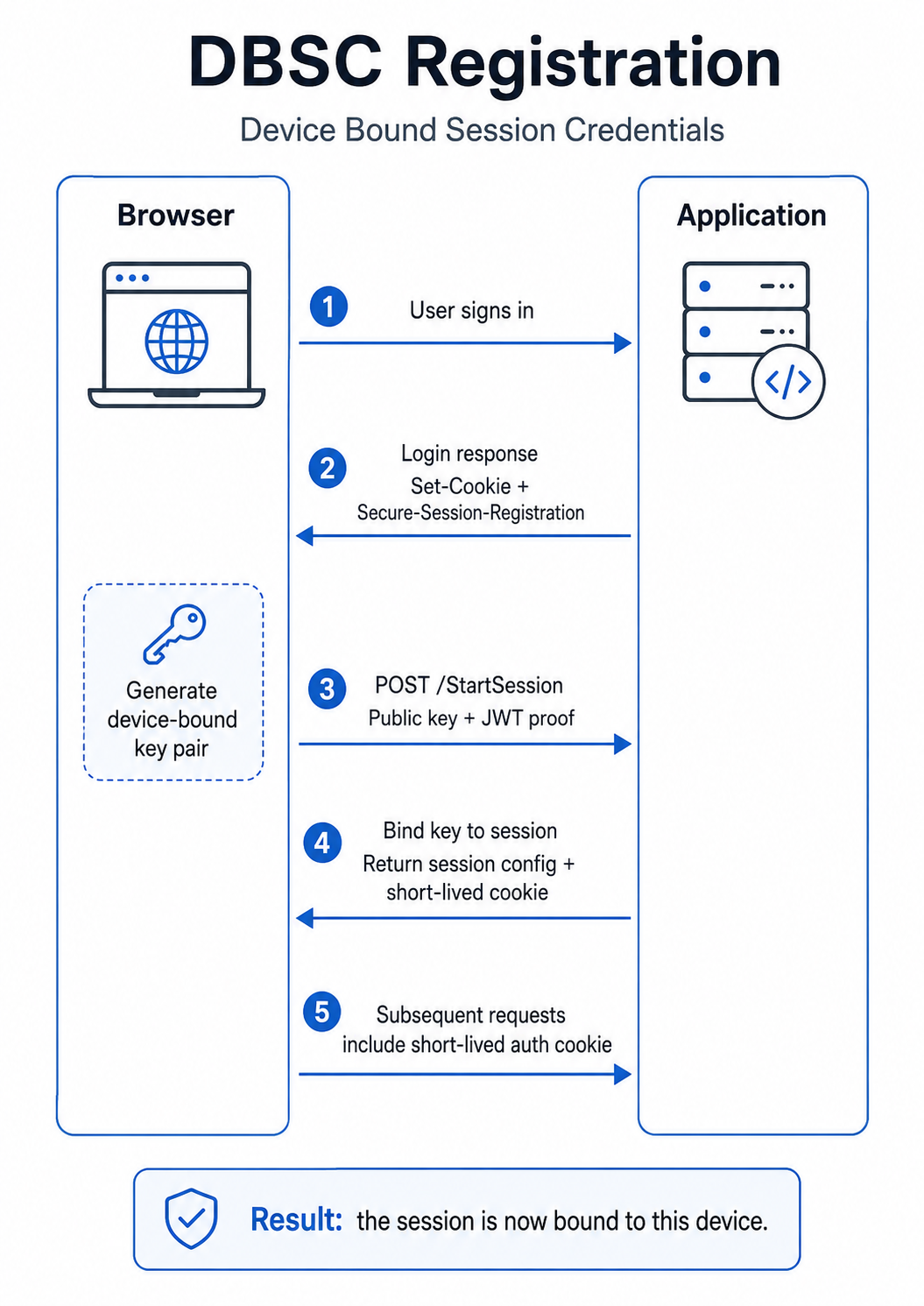
As the DBSC cookie is only valid for a very short period, it is of course going to need to be renewed quite regularly, but we don't want that process to have a negative impact on the responsiveness of the site. To make sure that doesn't happen, the browser will proactively renew the DBSC cookie before expiry, in the background, as required. In step 4 above, when the DBSC registration was confirmed, the application will return a JSON payload similar to this:
HTTP/1.1 200 OK
Content-Type: application/json
Sec-Secure-Session-Id: 9c2b7f3e1a
Set-Cookie: dbsc=5e0a91c4d7; Path=/; Secure; HttpOnly; SameSite=Lax; Max-Age=300
{
"session_identifier": "9c2b7f3e1a",
"refresh_url": "/dbsc/refresh",
"scope": {
"origin": "https://report-uri.com",
"include_site": false
},
"credentials": [
{
"type": "cookie",
"name": "dbsc",
"attributes": "Path=/; Secure; HttpOnly; SameSite=Lax"
}
]
}The browser has now set the DBSC cookie on the device and it has the information on where to refresh the cookie, and how often it needs to do it.
DBSC Refresh
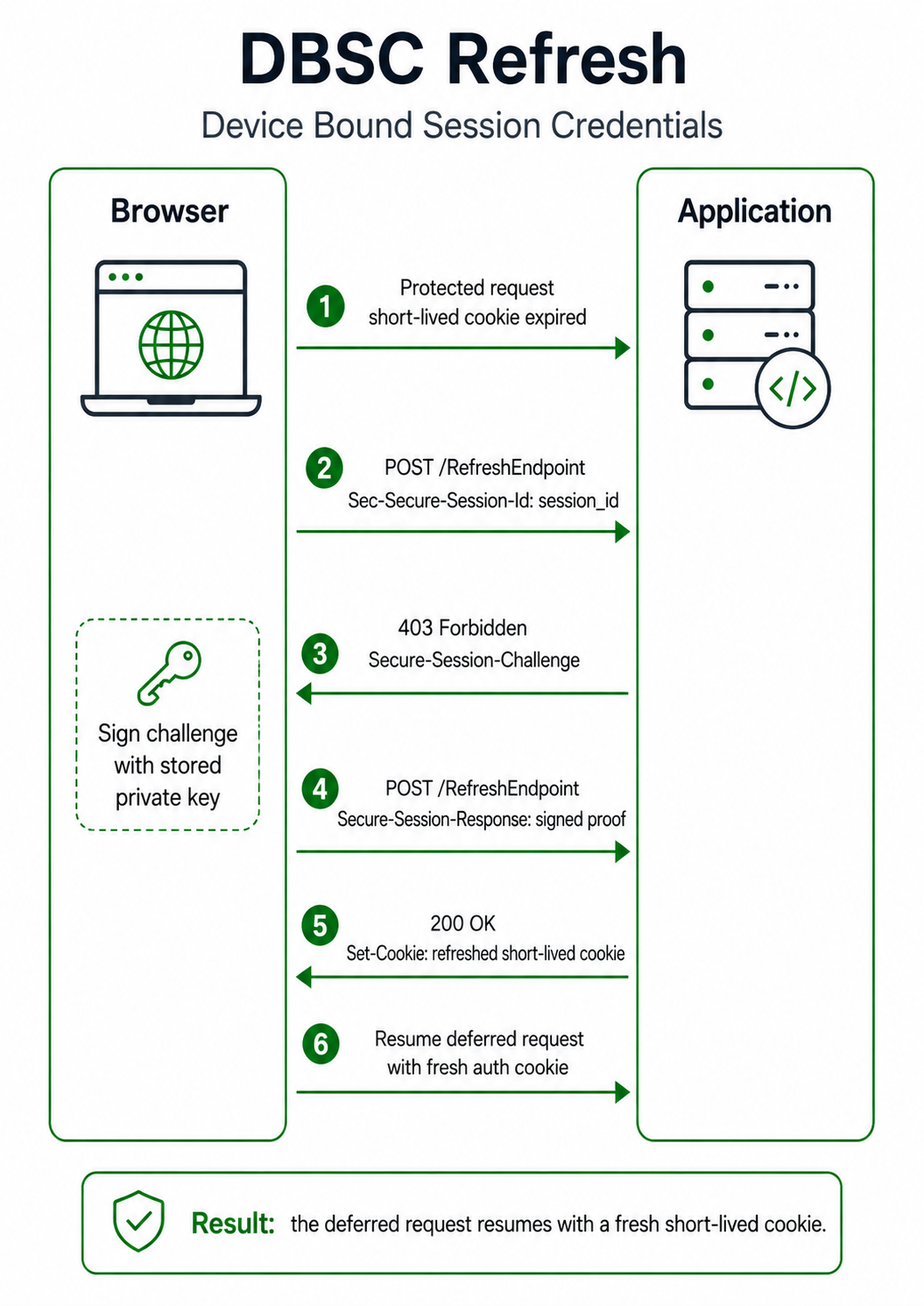
The refresh process for DBSC is also really simple, and there can be a two-step process or a one-step process, depending on the circumstances. I will go through the two-step process and cover everything, but most of the time you're only ever going to see the one-step process.
There are two circumstances where the browser is going to refresh the DBSC cookie:
- You're actively browsing a site and the DBSC cookie is approaching expiration. The browser will proactively and transparently refresh the DBSC cookie in the background, with no interruption to your browsing.
- You navigate to a site where you're still logged in but the DBSC cookie has since expired, or perhaps you bring an old/dormant tab back to focus where the DBSC cookie has expired. The browser will first refresh the DBSC cookie and then conduct the navigation/reload.
To start the refresh process, the browser will send a request to the refresh endpoint advertised when DBSC was registered above. Step 1:
POST /dbsc/refresh HTTP/1.1
Host: report-uri.com
Sec-Secure-Session-Id: 9c2b7f3e1a
Content-Length: 0
The application will then respond and issue the challenge to the browser:
HTTP/1.1 403 Forbidden
Secure-Session-Challenge: "def456"; id="9c2b7f3e1a"
Sec-Secure-Session-Id: 9c2b7f3e1a
Content-Length: 0
Now the browser has the challenge we can move on to Step 2. The browser will prove possession of the private key by signing the challenge and returning it to the application.
POST /dbsc/refresh HTTP/1.1
Host: report-uri.com
Sec-Secure-Session-Id: 9c2b7f3e1a
Content-Type: application/jwt
Content-Length: 1337

eyJhbGciOiJFUzI1NiIsInR5cCI6Imp3dCJ9.eyJhdWQiOiJodHRwczovL3JlcG9ydC11cmku
Y29tL2Ric2MvcmVmcmVzaCIsImp0aSI6ImtRMnZOOWFaN3RSNHhXMXBMNnlKM21FOHNCNWRI
Y1VmIiwiaWF0IjoxNzE2MjMwNDAwLCJzdWIiOiI3ZjNjMWE5MGIyNGU0ZDhlOWMxYThiN2Yz
YzFhOTBiMiJ9.MEUCIQDx7w...truncated
The application can now verify that signature using the public key stored against the session and if it validates, the browser has proven possession of the private key, so we can issue a new DBSC cookie.
HTTP/1.1 200 OK
Set-Cookie: dbsc=R8wF2nQ6yV; Max-Age=300; Path=/; Secure; HttpOnly; SameSite=Lax
Secure-Session-Challenge: "ghi789"; id="9c2b7f3e1a"
Sec-Secure-Session-Id: 9c2b7f3e1a
Content-Type: application/json
Content-Length: 312
{
"session_identifier": "9c2b7f3e1a",
"refresh_url": "/dbsc/refresh",
"scope": {
"origin": "https://report-uri.com",
"include_site": false,
"scope_specification": []
},
"credentials": [
{
"type": "cookie",
"name": "dbsc",
"attributes": "Path=/; Secure; HttpOnly; SameSite=Lax"
}
]
}The browser now has a new DBSC cookie that it can use until it needs refreshing, at which point, the process will repeat. Here's a diagram to give an overview of the full two-step refresh process.
Optimising for one-step refresh rather than two-step
The difference between a two-step refresh process and a one-step refresh process is whether or not the browser already has a challenge it can sign and return to the server to refresh the DBSC cookie. The challenge is communicated to the browser in the Secure-Session-Challenge HTTP response header. If we look at the two roundtrips to the refresh endpoint above, the browser sent a empty POST in the first one, indicating it has no challenge. The application responds with a 403 and
Secure-Session-Challenge: "def456"; id="9c2b7f3e1a"
The browser then signed this challenge and returned it to the refresh endpoint. The application responded with a 200 and the new DBSC cookie, but also the next challenge.
Secure-Session-Challenge: "ghi789"; id="9c2b7f3e1a"This means that the next refresh can now become a one-step refresh as the first roundtrip to fetch the challenge can be completely skipped, the browser already has it!
We now know the only scenario where you're going to see a two-step refresh is if the browser doesn't have the challenge. The two most likely causes for this are:
- The first refresh after registration for an active session.
- A delayed refresh after the DBSC cookie and challenge have expired.
The first of these seems odd at a glance. The browser has just registered for DBSC and got the first DBSC cookie, how can it possibly not have the next challenge? The reason is that the application can't send the next challenge on the response that creates the DBSC session on the browser. As a DBSC session hasn't been created on the browser yet, there is no session to store the challenge against. The challenge has to be sent after registration. To solve this, the application can pre-emptively send the next challenge on any response to the browser after registration has completed, it doesn't have to be a response to a DBSC-based request. You can send it the next time the browser loads a page, for example:
GET /account/home HTTP/1.1HTTP/1.1 200 OK
Content-Type: text/html
Secure-Session-Challenge: "ghi789"; id="9c2b7f3e1a"
<html>
...
</html>
This is what Report URI currently does in production. After DBSC has been successfully registered, the next navigation will trigger the challenge to be sent to the browser. Of course, the other option is that the application doesn't have to worry about this and it can just allow that first refresh after registration to be a two-step process. It's happening asynchronously in the background, so it's not a huge loss.
The second scenario that you're always going to see a two-step refresh process is if you've had a tab in the background for a while and both the DBSC cookie and the challenge have expired. There's no way around this one and a two-step process here is expected to seed the new refresh cycle, which will be one-step from then onwards.
Privacy Concerns
Being able to bind a unique and reliable identifier to a device is an incredibly powerful security mechanism, but it could also provide the ability to be a dangerous tracking mechanism too. The spec immediately set out to address potential privacy concerns and during our implementation, testing and usage of DBSC, I've not yet found anything that would be a concern from a privacy standpoint. The biggest solution to head off a problem is that the key pair used for DBSC is not persistent, each new DBSC session gets a new key pair. This means you can't even use DBSC to track a physical device across different sessions on the same website, let alone across different sites. There are also additional privacy considerations:
- Lifetime of a session/key material: This should provide no additional client data storage (i.e., a pseudo-cookie). As such, we require that browsers MUST clear sessions and keys when clearing other site data (like cookies).
- Implementing this API should not meaningfully increase the entropy of heuristic device fingerprinting signals. In particular, DBSC should not leak any stable device identifiers.
- As this API MAY allow background "pings" for performance, this must not enable long-term tracking of a user when they have navigated away from the connected site.
- Each session has a separate new key created, and it should not be possible to detect that different sessions are from the same device.
Client Support
As it stands right now, we have support for DBSC in Chrome on Windows (announcement), and it looks like we could get it soon on macOS too, I'd guess at some point in 2026. Microsoft have also done an origin trial in Edge so there are some good indications coming from them too, they've merged their BPOP work in to DBSC. We're still waiting on a recent position from Mozilla, their last statements were made back in 2023.
The good news is that DBSC will gracefully fall back and have no impact on clients that don't support it, so we can deploy it now and protect a subset of our users that will only grow over time.
Sources
Device Bound Session Credentials (DBSC) | Chrome for Developers
Device Bound Session Credentials now available on Windows | Chrome for Developers
Origin trial: Device Bound Session Credentials in Chrome | Chrome for Developers
Device Bound Session Credentials (W3C draft spec)
w3c/webappsec-dbsc spec repo