
Dogfooding is often talked about as a best practice, but I don't often see the results of such activities. For all new features introduced on Report URI, we are always the first to try them out and see how they work. In this post, we'll look at a few examples of issues that we found on Report URI using Report URI, and how you can use our platform to identify exactly the same kind of problems!
Dogfooding
If you're not familiar with the term dogfooding, or 'eating your own dogfood', here's how the Oxford English Dictionary defines it:
Computing slang
Of a company or its employees: to use a product or service developed by the company, as a means of testing it before it is made available to customers.
It's pretty straightforward and something that we've been doing quite literally since the dawn of Report URI over a decade ago. Any new feature that we introduce gets deployed on Report URI first of all, prompting changes, improvements or fixes as required. Once things are going well, we then introduce a small selection of our customers to participate in a closed beta, again to elicit feedback for the same improvement cycle. After that, the feature will go to an open beta, and finally on to general availability. We currently have two features in the final open beta stages of this process, CSP Integrity and Integrity Policy, and it was during the dogfooding stage of these features that some of things we're doing to discuss were found.
Integrity Policy - finding scripts missing SRI protection
If you're not familiar with Subresource Integrity (SRI), you can read my blog post on Subresource Integrity: Securing CDN loaded assets, but here's is a quick explainer. When loading a script tag, especially from a 3rd-party, we have no control over the script we get served, and that can lead to some pretty big problems if the script is modified in a malicious way.
SRI allows you to specify an integrity attribute on a script tag so that the browser can verify the file once it downloads it, protecting against malicious modification. Here's a simple example of a before and after for a script tag without SRI and then with SRI.
//before
<script src="https://ajax.googleapis.com/ajax/libs/jquery/2.1.3/jquery.min.js">
</script>

//after
<script src="https://ajax.googleapis.com/ajax/libs/jquery/2.1.3/jquery.min.js"
integrity="sha256-ivk71nXhz9nsyFDoYoGf2sbjrR9ddh+XDkCcfZxjvcM="
crossorigin="anonymous">
</script>
There have been literally countless examples where SRI would have saved organisations from costly attacks and data breaches, including that time when governments all around the World got hacked because they didn't use it. That said, it can be difficult to enforce the use of SRI and make sure all of your script tags have it, until Integrity Policy came along. You can now trivially ensure that all scripts across your application are loaded using SRI by adding a simple HTTP Response Header.
Integrity-Policy-Report-Only: blocked-destinations=(script), endpoints=(default)This will ask the browser to send a report for any script that is loaded without using SRI, and then, of course, we can go and fix that!
Here's a couple that we'd missed. First, we had this one come through.

This is interesting because it really should have SRI as something in the account section, and it turns out it almost did, but there was a typo!

That's an easy fix, and we found another script without SRI a little later too.
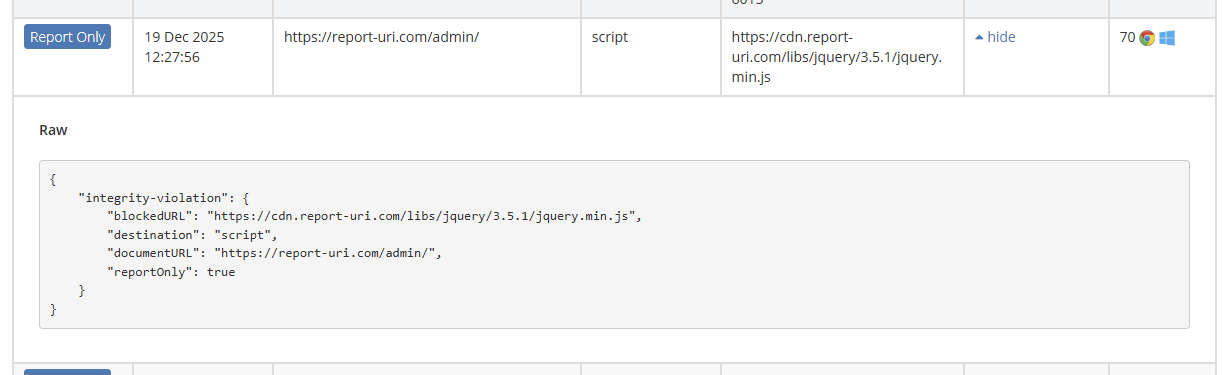
This script was in our staff admin section and it was missing SRI, it was reported, and we fixed it!

Another great thing to consider about this is that you will only receive telemetry reports when there's a problem. If everything is running as it should be on your site, then no telemetry will be sent!
Content Security Policy - finding assets that shouldn't be there
The whole point of CSP is to get visibility into what's happening on your site, and that can be what assets are loading, where data is being communicated, and much more. Often, we're looking for indicators of malicious activity, like JavaScript that shouldn't be present, or data being somewhere it shouldn't be. But, sometimes, we can also detect mistakes that were made during development!

We started getting reports for these images loading on our site and because they're not from an approved source, they were blocked and reported to us. Looking closely, the images are from our .io domain instead of our .com domain, which is what we use in test/dev environments, but not in production. It seems that someone had inadvertently hardcoded a hostname that they should not have hardcoded and our CSP let us know!

Another simple fix for an issue detected quickly and easily using CSP.
But normally we don't find anything!
Of course, you're only ever going to find a problem by deploying our product if you had a problem to find in the first place. Our goal is always to test these features out and make sure they're ready for our customers, but sometimes, we do happen to find issues in our own site.
I guess that's really part of the value proposition though, the difference between thinking you don't have a problem and knowing you don't have a problem. Whether or not we'd found anything by deploying these features, we'd have still massively improved our awareness because we could then be confident we didn't have those issues.
It just so happens that we didn't think we had any problems, but it turns out we did! Do you think you don't have any problems on your site?