
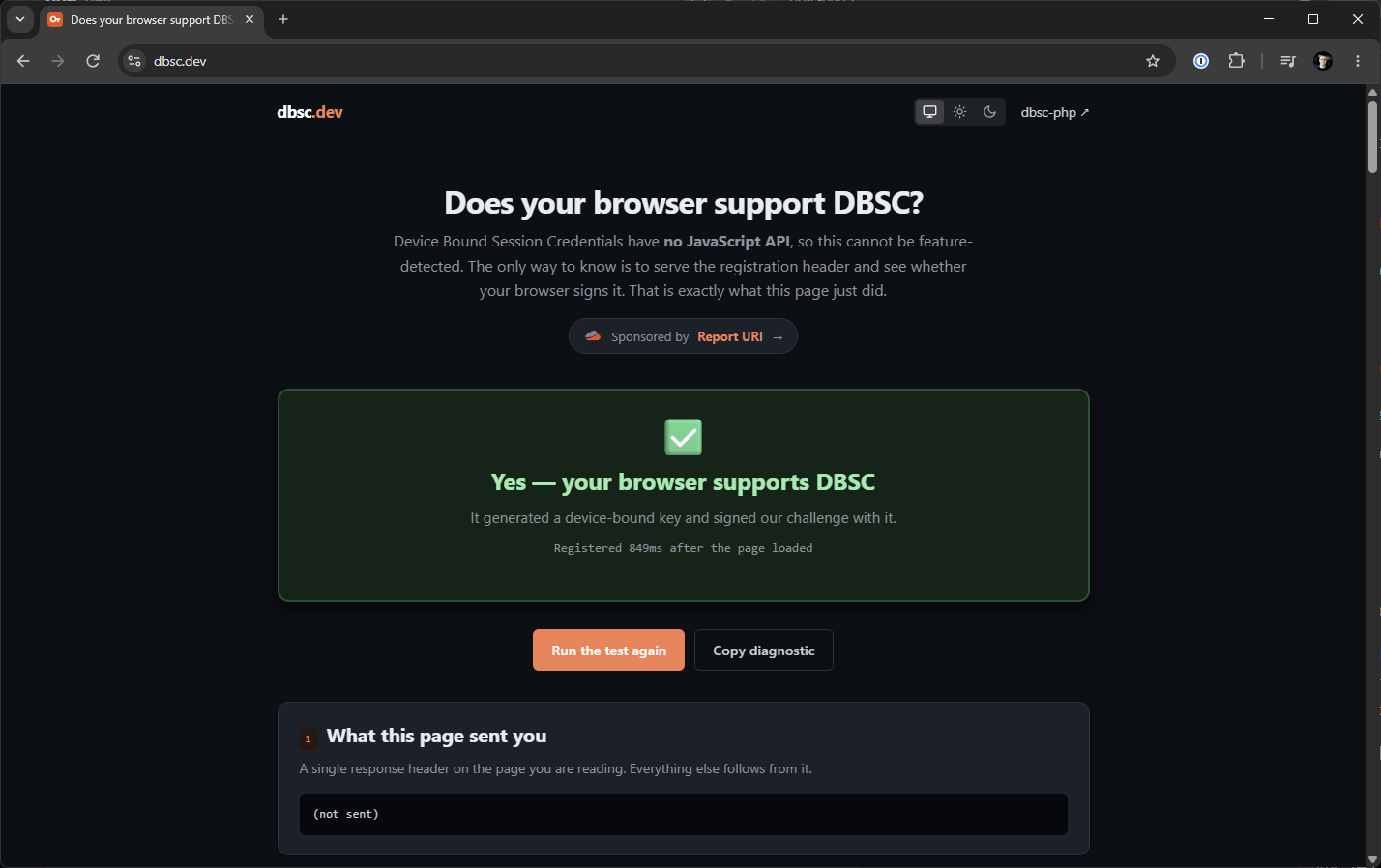
Every other web platform feature I've ever written about, I've been able to test in some easy way. Open DevTools, type the name of the thing, see if it's there. Device Bound Session Credentials doesn't work like that: there is no way for a page to ask the browser whether it supports DBSC. None! So I built dbsc.dev, which answers the question the only way I could think to answer it.
A Feature You Cannot Feature-Detect
Here's the thing that makes DBSC unusual. Almost everything we bolt onto the web platform comes with a hook you can poke at from JavaScript.
if (window.PublicKeyCredential) { /* passkeys are available */ }
if ('serviceWorker' in navigator) { /* ... */ }
DBSC has nothing. No navigator.deviceBoundSessions, no constructor, no promise that rejects. The entire protocol lives in HTTP headers, and it's driven by the server, not the page. Your server says "I'd like to bind this session to a device key" and the browser either quietly gets on with it, or it quietly ignores you.
That design is deliberate, and it's a good thing. It's what makes DBSC safe to deploy: a browser that doesn't support it ignores the registration header and carries on with normal cookie auth, so you cannot lock anyone out by switching it on. I've made that point before and I stand by it. But it does leave you with an awkward question if you're on the other side of it, wondering whether your own browser is doing any of this.
You can't ask. You can only find out by trying...
Watching For The Answer
So that's what the site does. When you load dbsc.dev, the response carries a registration header, exactly as a real deployment would:
HTTP/2 200
Cache-Control: no-store
Secure-Session-Registration: (ES256); path="/dbsc/register"; challenge="519aaae6ee95..."
If your browser supports DBSC, it generates a key pair, signs that challenge with the private half, and POSTs the result back to /dbsc/register without any involvement from the page at all. On my machine that round trip takes about 700ms. Meanwhile, the page is polling a status endpoint, waiting to see whether the registration lands.
If it lands, you get a green box. If nothing arrives within eight seconds, you get a red one — and I've been careful about what that red box says. It says no registration attempt arrived in eight seconds. It does not say your browser can't do DBSC, because that's not something this test can prove. Maybe an extension stripped the header. Maybe an enterprise policy turned it off. Maybe you're on a platform with no key store to bind to. The site lists all of that rather than claiming certainty it doesn't have.
The Bit I Actually Wanted To Build
A yes/no answer is fine, but it isn't very interesting, and honestly you can usually guess. What I wanted was to see the protocol in action and make it useful for debugging.
So once your browser registers, the page shows you the whole exchange. The registration JWT your browser sent, decoded. The device public key it generated, as a JWK, with its thumbprint and its PEM. The session instructions the server sent back. A plain fetch() proving the bound cookie is riding your ordinary requests, which is the entire security property in one line.
One detail I enjoyed: the device key doesn't travel where you might expect. The payload of that registration JWT is almost empty.
{
  "jti": "mvt-nE8miIcX--li4LlmEo0bcs5m3BhqJoS2aob76Pc"
}
Just the challenge, signed. The key itself is up in the JWT header, as a jwk alongside "typ": "dbsc+jwt". I had it wrong in my own code until I decoded a real one from Chrome.
While I'm being precise about what the site can and can't tell you: it cannot tell you your key is in a TPM. DBSC carries no attestation, so a server sees a public key and a valid signature and that's it. Anyone claiming otherwise from server-side data alone is guessing.
Watching A Refresh Happen Live
The refresh is the part nobody ever sees, because in production it happens to a cookie you were never looking at. It's also the part that makes DBSC work: the bound cookie is short-lived, and renewing it needs a fresh signature from the device key. Both the cookie and the challenge have to change every single time.
I wanted people to be able to watch that, so I set the bound cookie's lifetime to three minutes. Keep the tab open and you can see your device re-sign, with the old and new cookie values shown side by side. I couldn't go shorter than three minutes as I kept hitting TPM signing quota limits, so apologies for the short wait.
Why You Might Actually Use It
If you're curious, it answers the question of whether or not your browser supports DBSC in just a few seconds, and then shows you the protocol if you'd like to know more.
If you're implementing DBSC, it's a reference exchange you can point at. Here's what a real registration JWT looks like. Here's the two-phase refresh — the 403 with the challenge, then the signed retry. Here's what rotation looks like when it's working. I wrote the server side of this twice before I got the wire protocol right, and a working example would have saved me a fortnight.
If you're filing a bug, there's a copy button that gives you the whole diagnostic as text: the verdict, the decoded JWTs, the key, the timeline, and what your browser told us about itself. Rather more useful in an issue than "DBSC doesn't work for me".
On Privacy
Nothing is retained. Each visit mints a throwaway identifier, and the key material and timeline are deleted within the hour. No IP logging, no analytics on your session, nothing shared. The key you see on the page is a public key your own browser generated for that one page load, and it's worthless to me.
I wanted to be clear on this, given the site's entire subject is device-bound cryptography.
Under The Hood
The server side is dbsc-php, the open source library I extracted from Report URI's production DBSC integration. The site is a couple of hundred lines of PHP on top of it. If you want to run DBSC on your own site and you're in the PHP world, that library carries all the wire-protocol corrections that only surface when you integrate against a real browser — including several I learned about the hard way and wrote up separately.
The site is sponsored by Report URI, same as Why No Passkeys?.
Client Support
Chrome remains the only browser that implements DBSC. It's generally available on Windows, and support has since landed on macOS. Firefox and Safari have nothing. That'll date quickly, which is rather the point of building a site that tests instead of a table that claims.
Go and find out: dbsc.dev
Sources
- Device Bound Session Credentials — W3C specification
- Device Bound Session Credentials — Chrome for Developers
- Device Bound Session Credentials: making stolen cookies useless — my earlier explainer
- report-uri/dbsc-php — the server library
- Everything I Learned Shipping Device Bound Session Credentials - my stories from the trenches