
Device Bound Session Credentials (DBSC) is Chrome's answer to session cookie theft, usually by InfoStealer malware. Instead of a cookie being a bearer token that works anywhere it's pasted, DBSC binds the session to a private key that lives in your device's hardware and can never be exported. Chrome has to prove possession of that key to be issued fresh cookies, so a stolen cookie stops working almost immediately after it leaves the device.
That protection shipped to Windows first, backed by the TPM, and it's now on macOS, backed by the Secure Enclave.
The timeline
The Chrome Enterprise and Education release notes are the clearest official statement of platform availability:
Chrome 145 on Windows: Feature rolls out gradually.
Chrome 147 on macOS: Feature rolls out gradually.
Note "rolls out gradually" on both. This isn't a switch that flips for everyone the moment you update. It's a staged rollout controlled by Chrome's variations system (called Finch) so your browser may or may not have support for it just yet.
You can see that split in the Chromium source. In net/base/features.cc:
#if BUILDFLAG(IS_WIN)
BASE_FEATURE(kDeviceBoundSessions, base::FEATURE_ENABLED_BY_DEFAULT);
#else
BASE_FEATURE(kDeviceBoundSessions, base::FEATURE_DISABLED_BY_DEFAULT);
#endif
Windows gets DBSC by default. Every other platform, macOS included, is off by default and depends entirely on the variations seed to switch it on. If you're testing DBSC on a Mac and nothing happens like when I tested it, this is why.
Reading your variations assignment
chrome://version lists your active variations, but as hashed pairs:
4e5d86a8-5e85fe73
Those are the trial name and group name, each hashed. The algorithm is base::HashFieldTrialName in base/metrics/metrics_hashes.cc:
uint32_t HashFieldTrialName(std::string_view name) {
  std::array<uint8_t, SHA_DIGEST_LENGTH> hash;
  ::SHA1(reinterpret_cast<const uint8_t*>(name.data()), name.size(), hash.data());
  return U32FromLittleEndian(base::span(hash).first<4>());
}
SHA-1 of the name, take the first four bytes, read them as a little-endian uint32. The pair is then printed %x-%x, lowercase, no zero padding. Here's the Python to reproduce it:
import hashlib, struct

def hash_name(name):
    digest = hashlib.sha1(name.encode()).digest()[:4]
    return struct.unpack('<I', digest)[0]

trial = "DeviceBoundSessionCredentialsMac"
group = "Control_Post149Split_30pct"
print("%x-%x" % (hash_name(trial), hash_name(group)))
# 4e5d86a8-5e85fe73
Some useful values to search your own list for:
| Name | Hash |
|---|---|
Trial: DeviceBoundSessionCredentialsMac |
4e5d86a8 |
Group: Enabled |
3f4a17df |
Group: Disabled |
3d47f4f4 |
Group: Default |
ca7d8d80 |
Group: Control |
f23d1dea |
Group: ClientSideFeatureConflict |
bfe70100 |
The hash is one-way, so you can only confirm names you can guess, or you can just use this URL and view them as readable text:
chrome://version/?show-variations-cmd
That prints the full variations command line with readable trial and group names, in the form TrialName/GroupName so you can search for DeviceBoundSessionCredentialsMac.
What a control group looks like
This is where it got interesting on my Mac. My assignment:
DeviceBoundSessionCredentialsMac/Control_Post149Split_30pct
A control arm of a 30% split. Control groups exist so Google can measure the treatment against a baseline, and this one isn't passive. Scanning --disable-features in the same output, every one of these is tagged <DeviceBoundSessionCredentialsMac, meaning the study is what switches them off:
UseUnexportableKeyServiceInBrowserProcess
PersistDeviceBoundSessions
UnexportableKeyDeletion
DeviceBoundSessionsFederatedRegistration
DeviceBoundSessionsForRestrictedSites
EnableChromeRefreshTokenBinding
EnableOAuthMultiloginStandardCookiesBinding
EnableOAuthMultiloginStandardCookiesBindingForSecondaryPartitions
UseUnexportableKeyServiceInBrowserProcess is the important one. It's the browser-process service that mints the hardware-backed key. With it disabled, Chrome will happily parse a Secure-Session-Registration header, discover it has no way to create a key, and abandon registration. No request to your registration endpoint, no console warning, not even an entry in a chrome://net-export capture. The server sees a perfectly good offer go out and nothing come back, and that's what threw me off when I was trying to test this.
That also explains why forcing the feature flag on didn't help. In the variations command line, a feature you set yourself appears bare, with no <TrialName suffix, so I could confirm DeviceBoundSessions genuinely was enabled. The feature was on; the key service beneath it was off.
If you need to override a control assignment for testing, quit Chrome completely and launch it with both:
open -a "Google Chrome" --args \
  --enable-features=DeviceBoundSessions,UseUnexportableKeyServiceInBrowserProcess,PersistDeviceBoundSessions
Two gotchas worth knowing. open --args is ignored entirely if Chrome is already running, so quit it first. And Chrome's own "Relaunch" button rebuilds its command line from scratch, discarding anything you passed.
Where this leaves us
macOS support is here and it shipped in Chrome 147, but it's arriving gradually and a meaningful slice of users are in a control arm that switches the underlying key service off. If you're implementing DBSC and testing on a Mac, check chrome://version/?show-variations-cmd before you spend an evening debugging your implementation...
The good news for site operators is that none of this requires anything from you. DBSC degrades cleanly: a browser without support simply ignores the registration header, the binding is never created, and the session carries on as an ordinary cookie session. You can deploy it now and users pick up the protection as their browsers gain it. Over at Report URI in our beta deployment of DBSC, we've now increased our sample to 10% of users and things continue to go smoothly. As we gain more confidence, we'll keep increasing until 100% of users have DBSC available, and you can see if your current session has DBSC protection on the Settings page of your account:
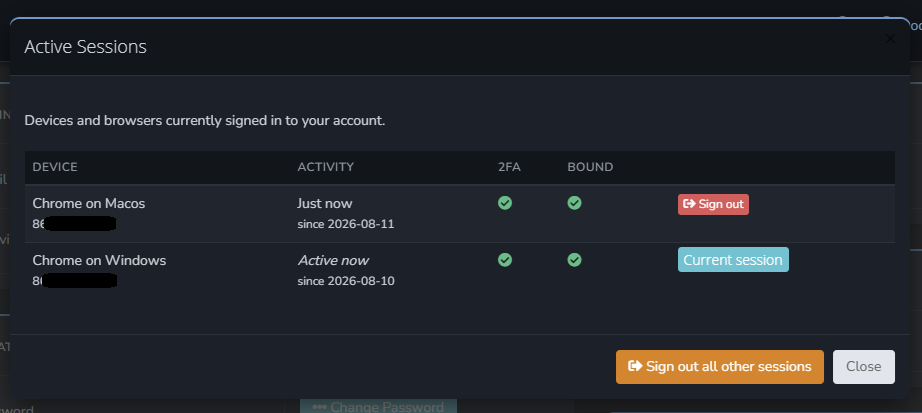
The 'Bound' column shows if your session has DBSC protection enabled with more and more customers seeing this as time goes by.