
Passwords have been the weak point in online authentication for decades. They can be reused, guessed, stolen, phished, leaked, sprayed, stuffed, and captured by malware. Passkeys are one of the first mainstream authentication technologies that remove many of those problems entirely, and any website still relying on passwords should be seriously considering support for them.
Why passwords are a problem
I think anyone reading this blog post will understand why passwords are a problem, but I'm going to outline it here to set the scene for why passkeys are such a huge improvement. The truth is, passwords can be a pain, and we've been fighting that pain for decades. We’ve battled password strength requirements, password reuse, credential stuffing, password spraying, database leaks, trivial phishing, and the recent rise of info-stealer malware. We’ve also had to build layers of defensive engineering around passwords, like salting, hashing, breached-password checks, and stronger password policies, just to make them survivable. The truth is, we've been using passwords for so long because they were the best thing we had, not because they're great.
I first wrote about password security all the way back in 2013 (link) and much more recently we've had to bring a sharp focus on our handling of passwords at Report URI. I covered this in Boosting password security! Pwned Passwords, zxcvbn, and more! and then Under Attack: Responding to the Rise of Info-Stealer Threats in just the last few months. Passwords continue to be a problem! 2FA has helped, and provided a much needed crutch for passwords over the years, but it doesn't solve the phishing problem which is arguably one of the biggest risks with passwords and current generation 2FA as my good friend Troy Hunt found out last year when he got his password and TOTP phished. We need something better, much better.
What Are Passkeys?
In really simple terms, passkeys are another way to authenticate a user. Just as a website might ask me for my username and password to authenticate me and log me in, they can instead rely on passkeys to do that, but with some considerable advantages. At their core, passkeys are just a pair of cryptographic keys, a public key and a private key. As their names would imply, the public key can be made public and shared with the website, whilst the private key remains private and secure on your device, not being shared with anyone. In many cases, that private key is protected by the same mechanism you already use to unlock your device or password manager, such as biometrics, a PIN, or a local device unlock.
How Passkeys Work at a High Level
It's surprisingly easy to give an overview of how passkeys work, both in terms of creating a passkey, and then using that passkey to access your account. Here's a diagram that details the entire process.
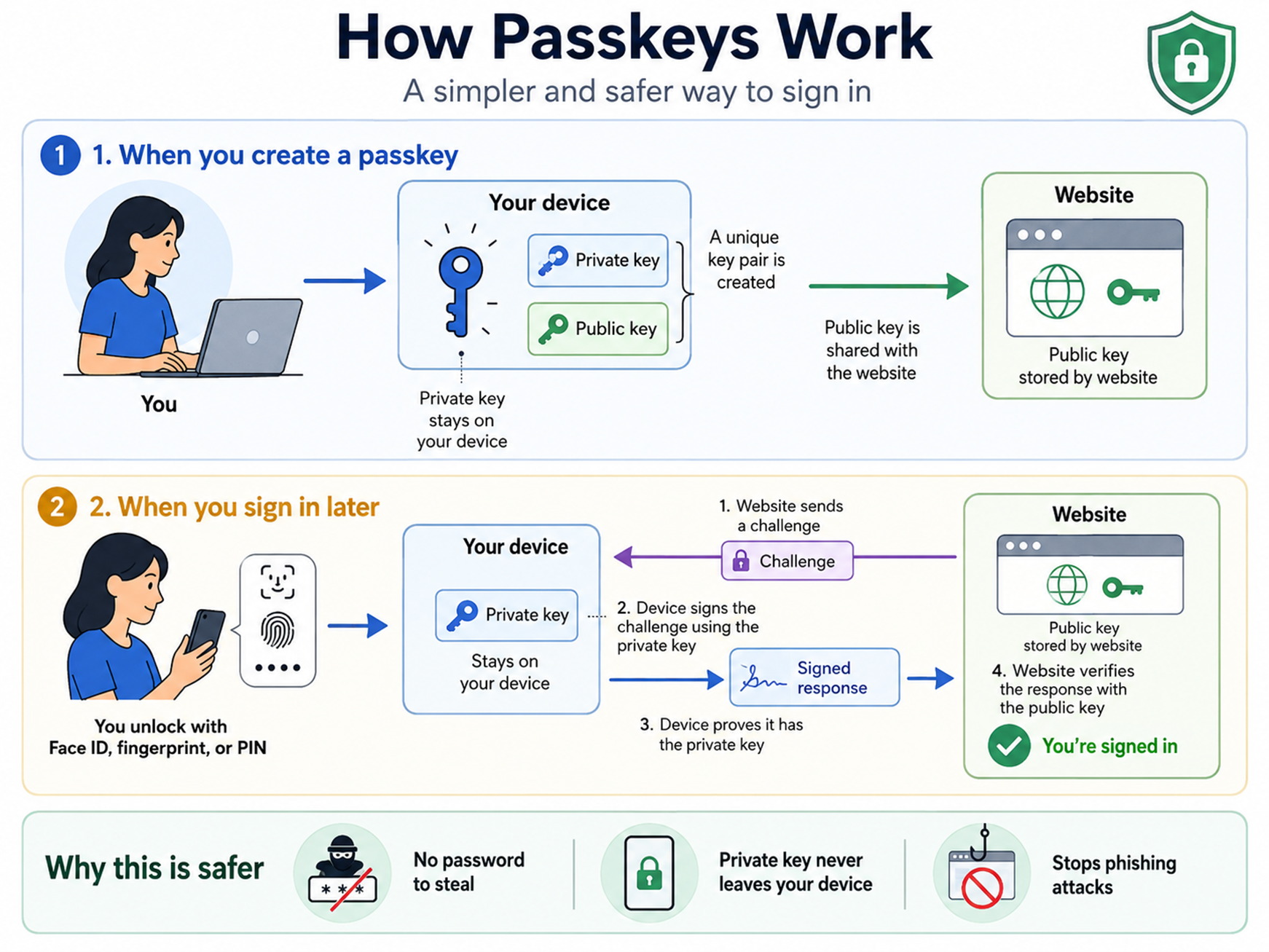
The first step of this process is known as Registration. This is when you create your key pair, securely store your private key on your device and share your public key with the website in question. The website will then store this public key against your account so they know it's yours. The passkey has now been registered and is ready to use!
The second step of the process is Authentication. This is when you then come to prove who you are by utilising your previously registered passkey. The website will issue a challenge to you and you must sign that challenge with your private key. You then return this signed challenge to the website which can validate that signature with your public key. This proves that whoever the website is talking to can use the private key associated with that account. Because the private key is protected by your device or passkey provider, that gives the website strong evidence that it is talking to you.
Why Passkeys Are Better
There are a few different areas where passkeys excel when compared to passwords, and each of them is compelling, so I'm going to talk about all of the main advantages.
Phishing Resistance
Undoubtedly, this has to be the single biggest advantage of using passkeys; they are incredibly resistant to phishing. You can be tricked into giving up your password by mistake, you can be tricked into giving up your 6-digit TOTP code by mistake, but you can't be tricked into giving up your passkey by mistake. When you register your passkey and it's stored on your device, your device will lock that passkey to the origin that it can be used for. That means if you create a passkey on report-uri.com, but then find yourself on a phishing website like rep0rt-ur1.com that's impersonating us and is trying to phish your credentials, your device will simply not allow you to use your passkey because you are not in the right place. Your device now knows where your passkey can be used, and it will not let you use it anywhere else, which is a protection that can't be offered for passwords.
No More Weak Passwords
Everyone knows that we can create weak passwords if we wanted to, but you can't create a weak passkey. Because the generation of the passkey is handled by your device, you can be sure that you're always generating a strong passkey and don't run into similar risks posed by using a weak password. Nobody is going to be able to guess your passkey like they might be able to guess a weak password, because you'll never have a weak passkey.
No More Password Reuse
There's nothing stopping you from reusing your password across different services, but your device is required to create a new, unique passkey for each website that you register with. This means that there are no shared passkeys across different services and another category of risk is eliminated.
No More Credential Stuffing or Password Spraying
Largely as a consequence of the above two points, an attacker can't use these two common and effective strategies for trying to gain access to accounts that they shouldn't have access to. With no more weak and/or reused credentials, you can say goodbye to some pretty serious problems.
No Shared Secret in your Database
When adding a passkey to an account, the website is required to store the public key in their database. The public key, as we mentioned and as hinted by its name, is not a secret! This means that in the event of a database breach, there isn't an additional piece of sensitive information in there to be compromised and all the attacker has managed to gain access to is the public key of the user. The private key remains safe and secure on the user's device that created it.
Conclusion
Passkeys are a major step forward, but they aren't magic. They remove many password-era risks, especially phishing and credential reuse, but they also introduce new implementation and threat-model questions. I’ll be digging into one of those in much more detail in my next post.
We recently launched support for passkeys on Report URI and you can read about that here: Launching Passkeys support on Report URI! We also had our passkeys implementation penetration tested, Bringing in the experts; Having our Passkeys implementation Security Tested. As you can see, we're pretty serious about passkeys!
With that said, there are some new considerations and risks that using passkeys brings, and I've just started to cover those in Security considerations when using Passkeys on your website. That blog post links out to our whitepaper on the problem, but I will also be writing a more detailed blog post with some new information in the coming days, so make sure to subscribe so you're notified when I publish that!