
We recently received a claim that Report URI had been breached and that customer credentials had been stolen. The claim was false: we do not store passwords in a recoverable format. But the credentials themselves were real, and that made the situation more interesting.
They appeared to come from info-stealer malware: compromised devices where usernames, passwords, cookies and other sensitive data had been harvested. This post walks through what happened, why our existing controls helped but we wanted to improve, and the new account lockout process we’ve introduced as a result.

Info Stealers
The first thing we need to do is understand the specific threat we're dealing with here. Info Stealers are a serious problem for services like ours because of how they operate. Info-stealer malware will infect a device and then start to harvest sensitive data from that device, which could include anything like usernames, passwords, payment card details, cookies from your browser, documents, and much, much more. If one of our customers is using a device that has been infected with info-stealer malware, our primary concern is that the account credentials have been compromised, which is what happened in this case. The email address and password for a Report URI account is accessed by the malware on the user's device when it is used to login...
As a website operator, despite the multiple layers of account security we have, no online service can fully defend against this type of threat. If the user's device is compromised and their account credentials are harvested directly from it, we have to acknowledge the limits of our own capabilities as a website, and that those credentials are going to be taken.
Existing Account Security Controls
We're pretty open about how we do things at Report URI, and we've already published a lot of information about how we handle account security. You can read my full blog post on boosting password security, but here's a summary of the existing measures we have in place:
zxcvbn
If you haven't heard of zxcvbn, you should absolutely go and check it out. It's a reliable password strength estimator created by Dropbox, and we use it to test how strong a password is when a user is trying to use it. If the password doesn't meet our complexity requirements, it isn't allowed to be used.
Password Managers
We have a variety of different measures in place to improve the effectiveness of Password Managers. On form elements we tell a password manager to create a crazy strong password, we provide information on where our password change endpoints are so it can be done automatically by your password manager, we hint which account is currently logged in so password managers know which entry to use, and a whole range of other quality of life attributes.
Two-Factor Authentication
We support TOTP 2FA on Report URI, and organisations have the ability to require that their team members have 2FA enabled on their account to access company data. We strongly recommend that any user has 2FA enabled, and you should keep an eye out for 2FA related announcements in the next week or so...
Password Hashing
When storing user passwords, we hash them with the bcrypt hashing algorithm, configured with a work factor of 10 and a 128-bit salt. In our chosen language of PHP, that looks like this:
password_hash($password, PASSWORD_DEFAULT)Bot Mitigation
Using a variety of approaches, we work to detect automated behaviour against sensitive endpoints like login or password reset. By trying to detect and stop bots, we can prevent automated attacks that are using stolen credentials, or are trying to guess credentials by trying them against the site.
Pwned Passwords
We make use of the Pwned Password API with their k-anonymity model to query for compromised passwords that have appeared in data breaches. This prevents users from using a password that is known to have been previously compromised.
None of that matters
And this is the problem! Despite all of the work that we've done above, if an info-stealer malware has infected a device and reads the user's password right off the keyboard, the attacker now has the email address and password, can head right to the login page and successfully login to the account. Despite that, this did identify an avenue for us to improve our processes and offer a little more protection to our users, over and above what we were already offering.
2FA still matters enormously here because it can stop a stolen password from being enough on its own. But the point remains: once the password itself is known to be compromised, we should not allow it to continue being used.
Our existing process
As I mentioned above, we use the Pwned Passwords API to query for passwords that our users are using so we can see if they have been compromised. That sounds like it might be a really bad idea at face value, but the k-anonymity model that the API uses means that we never send your password to the API, so this doesn't introduce any security or privacy concerns. It does, however, allow us to know if that particular password has been observed in a data breach. Head on over to the Report URI registration page and try to register with the password "correcthorsebatterystaple" (source if you don't get the reference), which is a reasonably strong password and will pass our complexity requirements, but it has also been compromised...
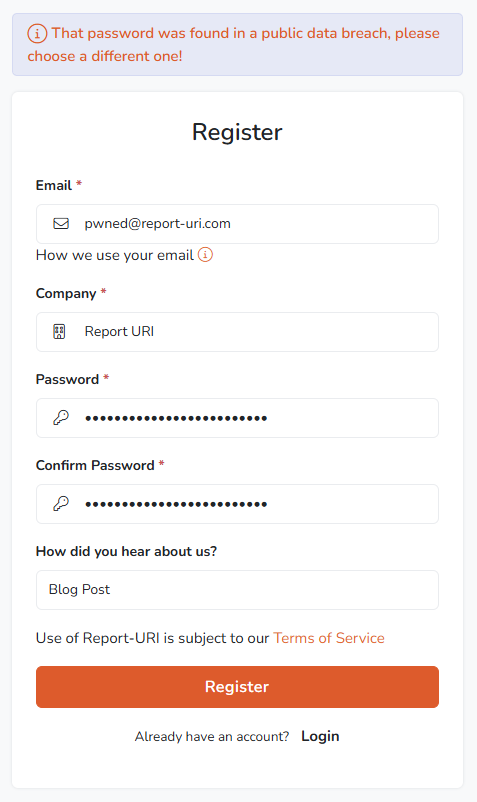
You're not allowed to use this password because the Pwned Passwords API tells us that it has been previously observed in a data breach. You can head to the Pwned Passwords website and test this for yourself to see the results.
This is a great feature, and it will stop you using a password that has been breached, and we also apply the same protection on the password reset process too, so you can't change to a breached password. But what happens if the password is breached after you set it up on our service?
Identifying the gap
The problem we have here is that because passwords are stored as a salted hash in our database, we don't have your password to do any kind of regular check to see if it has since been breached. This means that our only opportunity to do any check like this is when you next authenticate and we have that brief period where we have your clear-text password in memory to do the check.
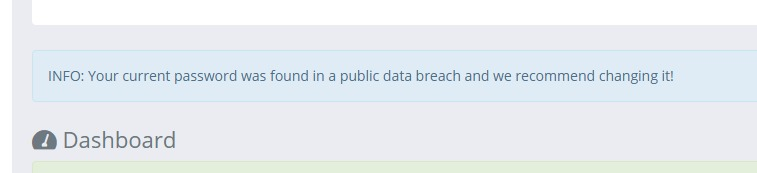
This is something that we already do and we will notify users if they login with a password that has been breached since they started using it. This is a great feature, and something that we've had for a long time, but it doesn't quite go far enough. If an attacker has your password and is able to login to your account, there's a good chance that they're probably going to ignore this warning and then continue with whatever it is they want to do! What we need to do is immediately suspend your account if we detect a login has occurred with a compromised password.
The new account lockout process
If you now complete a new authentication to your Report URI account, using a password that has become known to have been breached, your account will be immediately locked and will require a password reset to gain access. There is always a balance to strike with account lockouts because any automated lockout process can introduce Denial-of-Service considerations. In this case, we're only taking action when the submitted password is already known to be compromised, which means the account is already at material risk. We think requiring a password reset is the safer outcome.
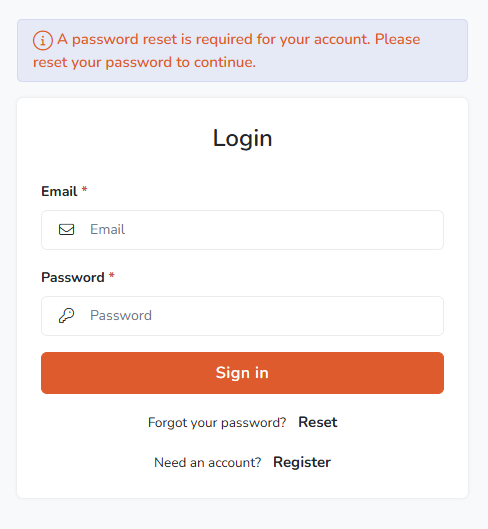
This gives us stronger protection so that if your password later appears in a breach or info-steal dataset, once that password is flagged as having been breached, you know that nobody will be able to use it to gain access to your account.
Service-wide improvements
Alongside the new automated process above, we have also added new controls to our staff admin portal that allow for the quick and easy locking of an account should it be required. In a recent example, which was what actually triggered this whole response, we had someone email us claiming to have breached our database and accessed user credentials. I knew this was nonsense right away because we don't store passwords in a recoverable format, but this could cause quite a panic if you were to receive a similar email. The email addresses matched Report URI accounts, and when we checked a small sample through our normal authentication flow, the passwords were valid too. I was able to quickly identify that these emails and passwords had been taken from the ALIEN TXTBASE Info Stealer and were being re-purposed to make it look like we had been breached. The scale of these datasets is enormous. HIBP describes ALIEN TXTBASE as containing 23 billion rows of stealer-log data, including email addresses, the websites they were entered into, and the passwords used. It's worth knowing about threats like these for when/if you ever find yourself on the receiving end of such an email. We were able to use our new capability to instantly lock these accounts and protect them, requiring the user to reset their password before gaining access again.
Future considerations
Another persistent threat from info-stealer malware like this is if the malware steals the session cookie of an authenticated session. This presents a completely different set of challenges and is also something that we're aware of and working on for a future update. For now, I wanted to share this information of what recently happened to us, what we've done about it to improve, and what you can do about it if it happens to you.
What should users do?
If you receive a password reset notification from us, complete the reset and make sure the new password is unique to Report URI. We also strongly recommend enabling 2FA, using a password manager, and checking any affected device for malware. If your password came from an info-stealer log, changing the password alone may not be enough if the device is still compromised.